Newline logo
  • INTERACTIVE DISPLAYS
    • Z Pro Series

      Z Pro Series

    • Q Pro Series

      Q Pro Series

    • Q+ Pro Series

      Q+ Pro Series

    • S Pro Series

      S Pro Series

    • C Series

      C Series

    • Accessories

      Accessories

  • DIRECT VIEW LED
    • DV One Plus

      DV One Plus

  • COMMERCIAL DISPLAYS
    • STV+ Series

      STV+ Series

  • LEGENDS
    • Z Series

      Z Series

    • Q Series

      Q Series

    • Q+ Series

      Q+ Series

    • NT+ Series

      NT+ Series

    • IP+ Series
      ip+ no UI

      ip+ Series

    • FLEX

      FLEX

  • SOFTWARE
    • Newline Broadcast
      Newline Broadcast
    • Newline Cast
      Newline Cast
    • Newline Display Management Plus
      Newline Display Management Plus
    • Newline Signage Pro
      Newline Signage Pro
    • Newline Secure
      Newline Secure
    • Newline Engage Cloud
      Newline Engage Cloud
    • Newline Cast+
      Newline Cast+
  • SUPPORT
    • Newline Contact
    • Office Locations
    • Download Center
    • Knowledge Base
  • Language
    • Global
    • AU&NZ
    • 繁體中文
    • 日本語
    • 한국어
    • Tiếng Việt
    • Bahasa Indonesia
    • ไทย
  • INTERACTIVE DISPLAYS
    • Z Pro Series
    • Q Pro Series
    • Q+ Pro Series
    • S Pro Series
    • C Series
    • Accessories
  • DIRECT VIEW LED
    • DV One Plus
  • COMMERCIAL DISPLAYS
    • STV+ Series
  • LEGENDS
    • Z Series
    • Q Series
    • Q+ Series
    • NT+ Series
    • IP+ Series
    • FLEX
  • SOFTWARE
    • Newline Broadcast
    • Newline Cast
    • Newline Display Management Plus
    • Newline Signage Pro
    • Newline Secure
    • Newline Engage Cloud
    • Newline Cast+
  • SUPPORT
    • Newline Contact
    • Office Locations
    • Download Center
    • Knowledge Base
  • Language
    • Global
    • AU&NZ
    • 繁體中文
    • 日本語
    • 한국어
    • Tiếng Việt
    • Bahasa Indonesia
    • ไทย

Understanding USB Type-C and Your Newline Flex

  • 03/19/2021
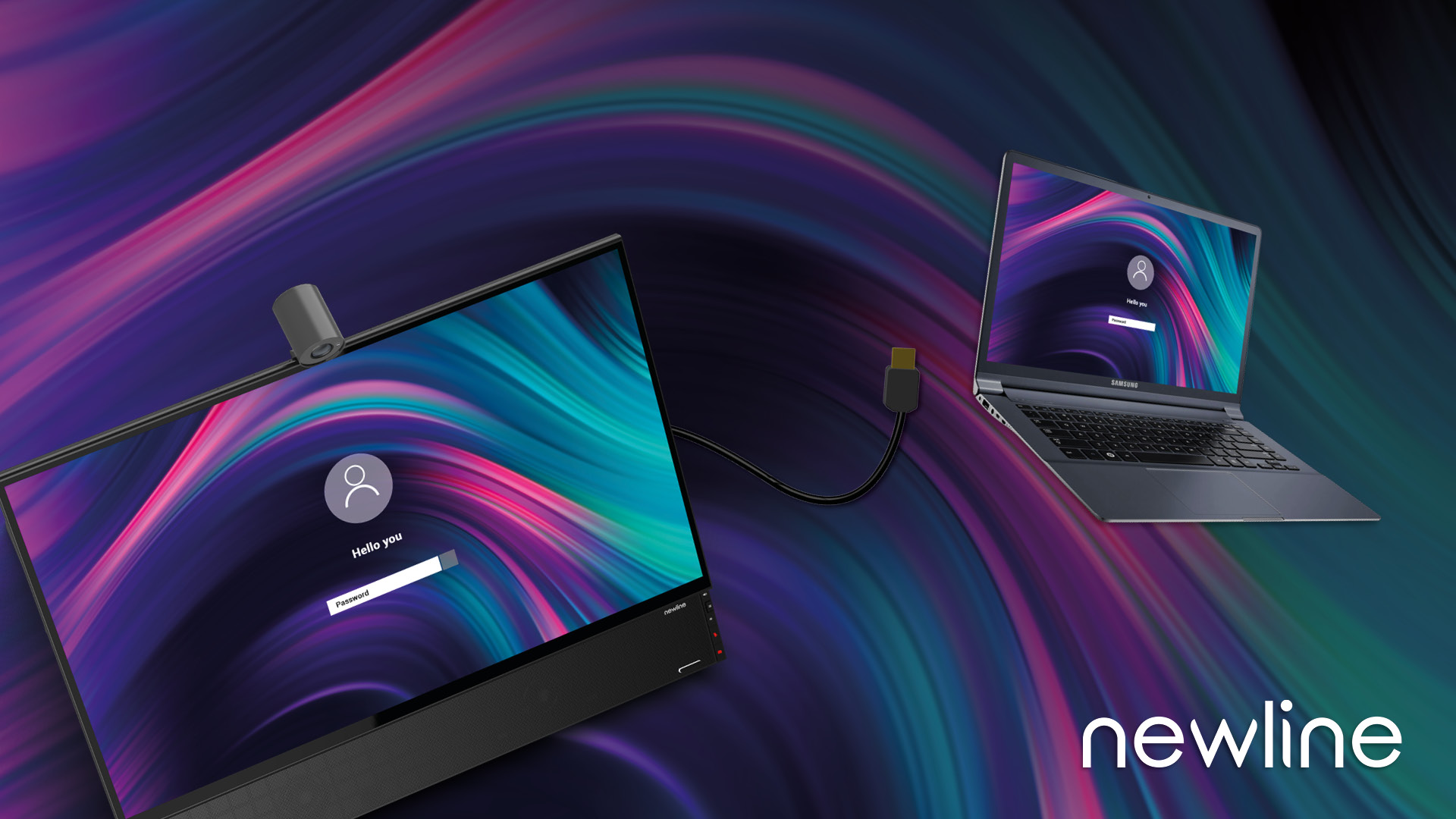
Flex USB Type C Connections

USB connectivity has seen rapid advancements over the years. It can be confusing when determining what your devices can actually do with this connectivity. This post is meant to share some of the basics around USB Type-C, what’s supported on Newline Flex (spoiler: everything), and how to check your device for compatibility. If you are looking for a slightly more technical explanation, read this article from our friends at B&H.

Not All USB Type-C Is Made Equally

You will find various types of USB Type-C but the actual functionality of the ports and cables vary. All the connectors include data transfer (at different speeds) and/or power (at varying wattages), and selectively audio, video, and touch. You can most easily determine the compatibility type on your device with one of these icons near the port:
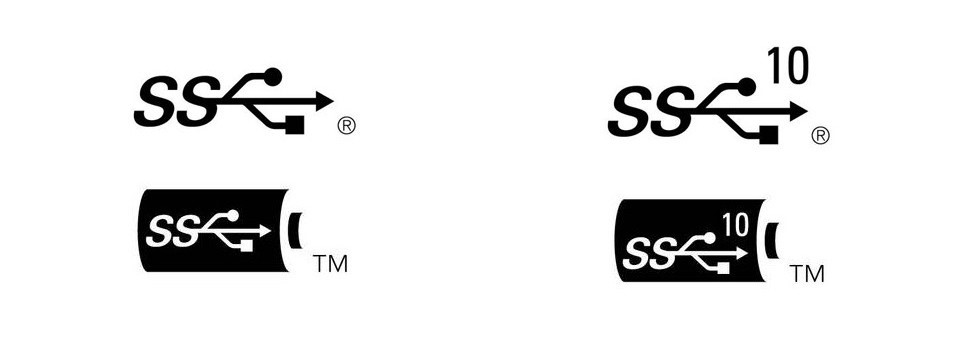
USB 3.0, USB 3.0 with Power Delivery, USB 3.1, and USB 3.1 with Power Delivery [Source]

With Thunderbolt, devices have full compatibility with speedy data transfer, audio, video, touch, and power delivery. This connectivity is found on all Apple laptops and Dell has standardized their later models with thunderbolt connectivity. More and more manufacturers are starting to adopt Thunderbolt connectivity. You will see a single thunderbolt icon on devices that have this connection.

Not all devices will have an easy-to-read icon near their port to indicate the level of USB Type-C connectivity. Be sure to check your device settings for a clear understanding of its capabilities and Newline Flex compatibility.

Across all levels of USB Type-C, you’ll see differences, so know what you’re getting when you purchase your cables and devices. For example, chargers have different amounts of power outputs, and the same is true for data transfer speeds.

Flex Supports All USB Type-C Capabilities

Newline Flex is a 27” desktop touch monitor with full touchback, an integrated camera and mic array, and 2.1 channel speakers. It lends itself to easy video conferencing, digital whiteboarding, document signing, annotating, and more. Its easy plug-and-play design via USB Type-C makes it compatible with numerous devices.

Flex supports all USB-C connection types, but the functionality you receive is dependent upon your non-Flex device. Flex supports data transfer, audio, video, touch, and power delivery with the appropriate connections.

The great thing about integrating Flex into your workflow is the backward compatibility. Despite the potential limitations of your connected device, Newline will be able to work with those capabilities. So, it’s important to double-check your device settings to get a clear understanding of what those are and if it aligns with your intentions for the Flex.

The optimal connection for Flex is Thunderbolt as it supports the data transfer, video, audio, touch, and power delivery we’ve been talking about. With this on your device, you will enjoy all the features Flex has to offer:

  • Display mirroring (or extending) to your Flex screen for ease of use and improved workflow.
  • Full audio and video playback on your Flex display and 2.1 channel forward-facing, integrated speakers.
  • Full touchback, an industry first, that allows you to control your laptop’s display via P-CAP touch on the Flex.
  • Up to 60W of power back to your device with the provided cable. You can work on your Flex while simultaneously charging your laptop with just one cable.

Check Your Devices

Reference this handy chart, which is also included in the Flex Quick Start Guide, to verify what your device can perform with the Newline Flex.
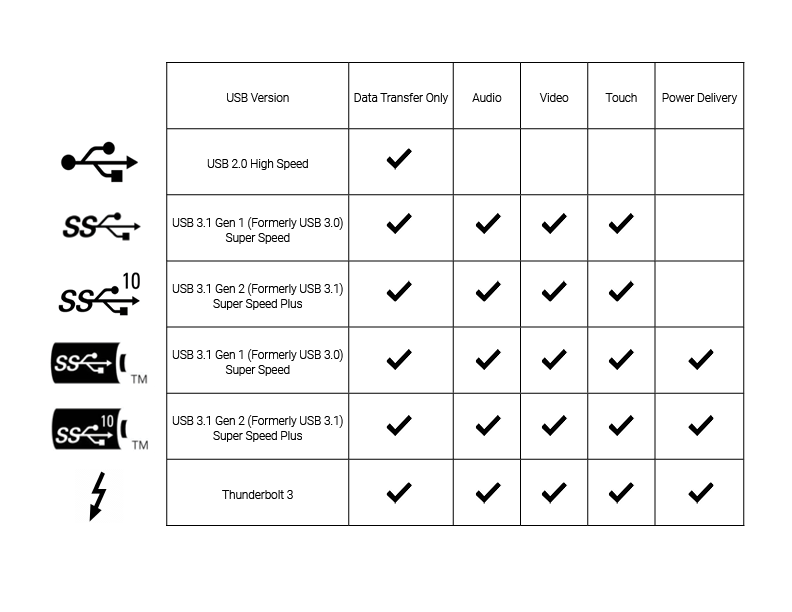
Newline Flex compatibility chart


Stay in Touch! Sign up for monthly updates:

Latest News
Newline Interactive Strengthens Global Partnership with APP Dynamic
Newline Showcases Cutting-Edge Interactive Technology and Digital Signage Solutions at ISE 2025
Breaking News: Newline Interactive Secures Extron IP Link Certification!
Newline Ranks No. 2844 on the 2024 Inc. 5000
Newline is Number #1….Again!!
News Pages
  • Press Releases
  • Success Stories
  • Press Releases
  • Success Stories
PrevPreviousLAVNCH & Learn: FLEXible Work Solutions from Newline
NextFLEX WINS RED DOT AWARD FOR HIGH-END DESIGNNext
  • YOU MIGHT ALSO LIKE

Newline Interactive Strengthens Global Partnership with APP Dynamic

Newline Showcases Cutting-Edge Interactive Technology and Digital Signage Solutions at ISE 2025

Breaking News: Newline Interactive Secures Extron IP Link Certification!

Products

  • Newline DV One+
  • Newline STV+ Series
  • Newline STV Series
  • Newline Z Pro Series
  • Newline Q Pro Series
  • Newline S Pro Series
  • Newline S Series
  • Newline C Series
  • Newline NT+ Series
  • Newline IP+ Series
  • Newline FLEX
  • Accessories
  • Newline DV One+
  • Newline STV+ Series
  • Newline STV Series
  • Newline Z Pro Series
  • Newline Q Pro Series
  • Newline S Pro Series
  • Newline S Series
  • Newline C Series
  • Newline NT+ Series
  • Newline IP+ Series
  • Newline FLEX
  • Accessories

Software

  • Newline Signage Pro
  • Newline Secure
  • Newline Engage Cloud
  • Newline Cast
  • Newline Cast+
  • Newline Broadcast
  • Newline Display Management Plus
  • Newline Teach Infinity II
  • Newline Signage Pro
  • Newline Secure
  • Newline Engage Cloud
  • Newline Cast
  • Newline Cast+
  • Newline Broadcast
  • Newline Display Management Plus
  • Newline Teach Infinity II

Markets

  • Education
  • Corporate
  • Education
  • Corporate

News & Events

  • Success Stories
  • Events
  • Success Stories
  • Events

Support

  • Knowledge Base
  • FAQ
  • Downloads Center
  • Knowledge Base
  • FAQ
  • Downloads Center

About Newline

  • Office Locations
  • Newline Contact
  • Modern Slavery Statement
  • Office Locations
  • Newline Contact
  • Modern Slavery Statement

Contact Us

6F.-3, No. 8, Taiyuan 2nd St., Zhubei City, Hsinchu County 30288, Taiwan
+886 3 550 4768
info_ap@newline-interactive.com

Facebook-f Linkedin-in Twitter Youtube
© Newline Interactive Inc. 2026*
Privacy Policy
|
Terms of Use
  • APAC
    • Global
    • USA
    • Europe
    • Spanish
    • Dutch
    • French
    • German
    • Polish
    • Russian
    • Chinese (Traditional)
    • Japan
    • Korea
    • Italian
    • United Kingdom
    • Indonesian
    • Vietnamese
    • Thai
    • Swedish
    • Arabic
    • AU & NZ